Step 01
Bring it up from anywhere.
Use a global shortcut to open the dashboard without losing your place. It is meant to feel like a quick systems layer, not another destination.
Spatial Agent Dashboard is a Mac app for people running multiple agent sessions at once. It gives you one place to see what is working, what is blocked, and what actually needs your attention right now.
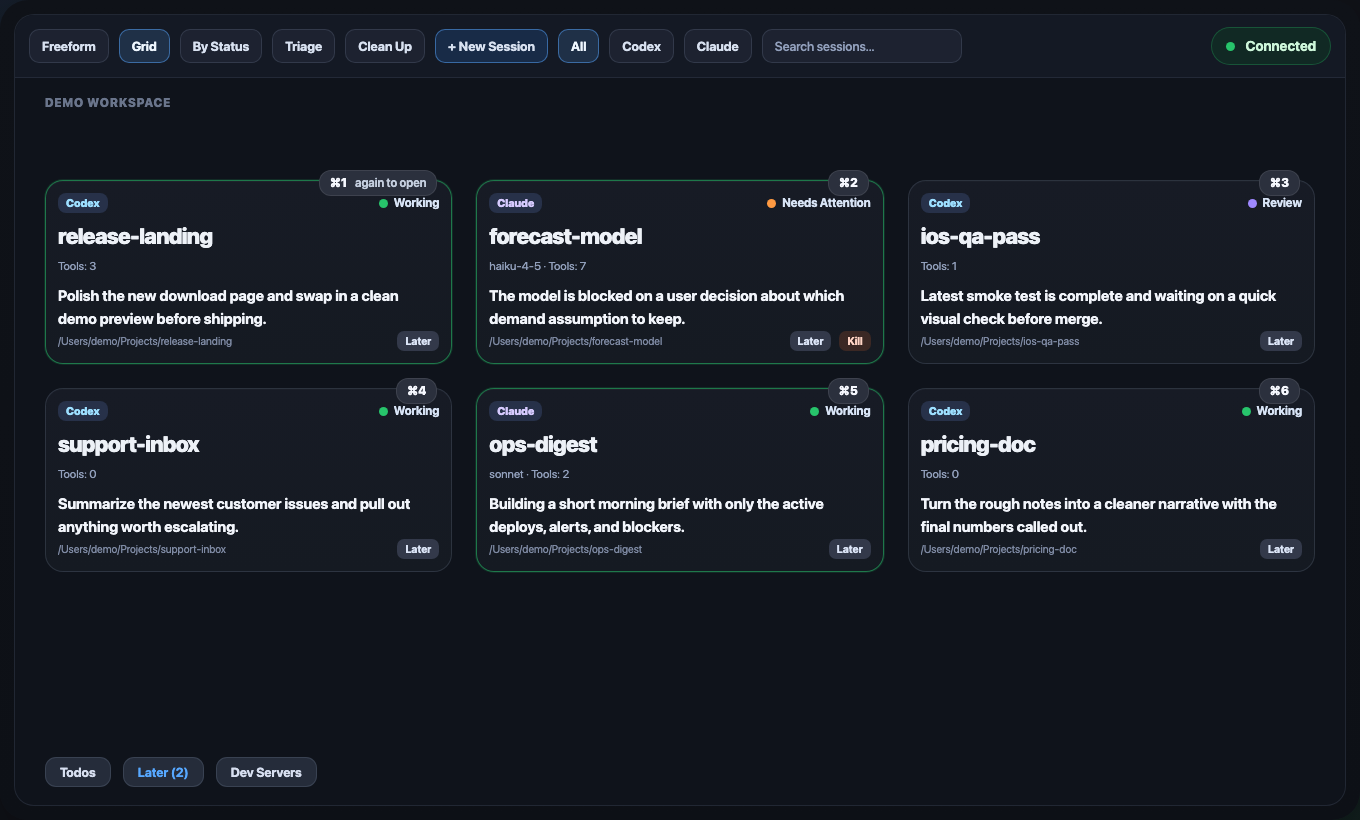
The point is not another launcher. It is a control surface for active agent sessions: see the state clearly, sort the work, and get back to the right terminal without hunting through tabs.
The flow is simple: bring the dashboard forward, scan what needs you, then jump back into the exact session that matters. The app handles the setup details so the workflow stays quick.
Use a global shortcut to open the dashboard without losing your place. It is meant to feel like a quick systems layer, not another destination.
Sessions are grouped visually so you can tell what is active, what is blocked, and what is waiting on you instead of guessing from memory.
Shortcut badges and card actions make it easy to jump back into the matching iTerm session and continue exactly where you left off.
When several agent sessions are moving at once, the hardest part is not typing. It is remembering what is running, what has stalled, and which tab deserves your attention next.
The app walks through permissions, hotkeys, and hook installation directly from onboarding. For clean installs it can configure things for you, and for existing setups it stays conservative.
Spatial Agent Dashboard is for people already living in Claude, Codex, and iTerm who want a better way to monitor and re-enter sessions throughout the day.